



TL;DR: Trimble ships SketchUp 2026.0 with a new in-app Collaboration Bar that lets you share via private invites or a public link, collect 3D-anchored comments, and sync views in real time. Visualisation gets AO distance and colour, invert roughness, and user-selectable material thumbnails on Windows. Performance improves across memory, selections, scene transitions, zoom extents, and purging. Live Components gain scale-by-inference grips and saner painting. Modelling and UI see multiple quality-of-life upgrades. You can reset activations inside the app. DWG and IFC pipelines are tidier. Studio users get Texture Projection and Surface Mesh for point clouds. LayOut on Windows adopts a SketchUp-like UI, picks up Trim, Extend, Fillet, Chamfer, and improves DWG handling and Scrapbooks.
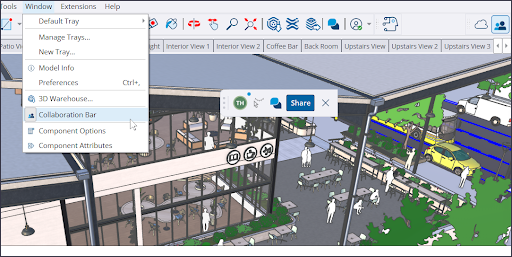
Collaboration in Desktop: invites, public links, live cursors, 3D comments
The new Collaboration Bar shares your model to Trimble Connect, then distributes either private invites with permissions (Owner, View Scenes, Comment) or a public link with adjustable access (No Access, View Scenes, View Model). Viewers open the model in a browser, see others’ cursors, navigate and measure when allowed, and leave threaded comments pinned with 3D markers that can be associated with scenes and camera states. You can pull everyone to your current view or jump to a viewer’s avatar to mirror their POV. Real-time updates are on by default.
Visualisation: AO distance & colour, invert roughness, pick your material thumbnail
Ambient Occlusion gets a Distance Multiplier so occlusion remains readable when zoomed out and a colour swatch to move AO away from neutral grey for clearer depth cues. Materials add an Invert Roughness toggle to flip PBR roughness maps quickly. On Windows you can choose Cube or Flat material thumbnails per asset, or let Auto decide.
Performance: lower memory, snappier selections, faster scenes and zoom
Model loading produces smaller memory spikes, component overhead is reduced, and graphics resource handling on Windows is more efficient. Day to day that means fewer freezes on large models and more fluid interactions. Internal benchmarks cite big gains for scene transitions, Zoom Extents, and Purge Unused, plus faster selections and inferences; exact results will vary by hardware and dataset.
Live Components: scale grips by inference; saner painting
The Scale tool now exposes inference-aware grips for Live Components, making placement and sizing more predictable than nudging bounding boxes. The Paint Bucket can apply custom materials outside a component’s predefined options, with better texture mapping and library compatibility. Not every existing Live Component has scale grips yet, but more are being added.
Modelling & UI QoL: rotate handle logic, see-through scale grips, profile-edge placement, scene undo/redo
Scale grips render through occluding geometry so you can grab the correct handle without enabling X-Ray. Rotation grips hide when you lock a rotation plane to prevent unintended moves. When placing groups or components, you can move from a profile edge so the object turns transparent and background targets remain visible. Scenes now support Undo/Redo, including create/rename/delete. Purge Unused defaults to off; it gains granular controls and a menu command you can bind to a shortcut. On Windows, panels and trays are easier to manage: right-click headers to toggle visibility, drag panels between trays, or tear them off into their own tray.

Activations: fix “too many devices” without leaving the app
If you exceed allowed activations, you can reset all activations and authorise the current device directly in SketchUp rather than detouring to account management.
Interoperability: DWG import options; real hatch import; 3D section export; cleaner polylines; unified IFC exporter
DWG import adds Import Layers as Groups to map DWG layers to grouped geometry with tags for visibility control, and Import Linework Flattened to force Z=0 for 2D CAD, minimising cleanup. Hatches import as faces or edges, depending on type. Export preserves section planes in 3D DWG for downstream section workflows. Other updates include welded polylines on import, better true-curve export, and fewer duplicate instance/definition name collisions. IFC export consolidates 2×3 and 4 into one file type with a new Export Options dialog and a Standard IFC Spatial Hierarchy toggle to scaffold IfcProject/IfcSite/IfcBuilding even if your Outliner is sparse.
Scan Essentials (Studio): Texture Projection, Surface Mesh, scene-aware visibility, reset to georeferenced origin
Studio subscribers get Texture Projection to bake imagery from scans onto SketchUp geometry as reusable materials and Surface Mesh to extract meshes from point clouds with guided parameters. Point-cloud visibility can be stored per scene in SketchUp and LayOut. You can also reset transformations to the original georeferenced coordinates on export.
LayOut (Windows): UI refresh, true drafting tools, stronger DWG pipeline, better Scrapbooks
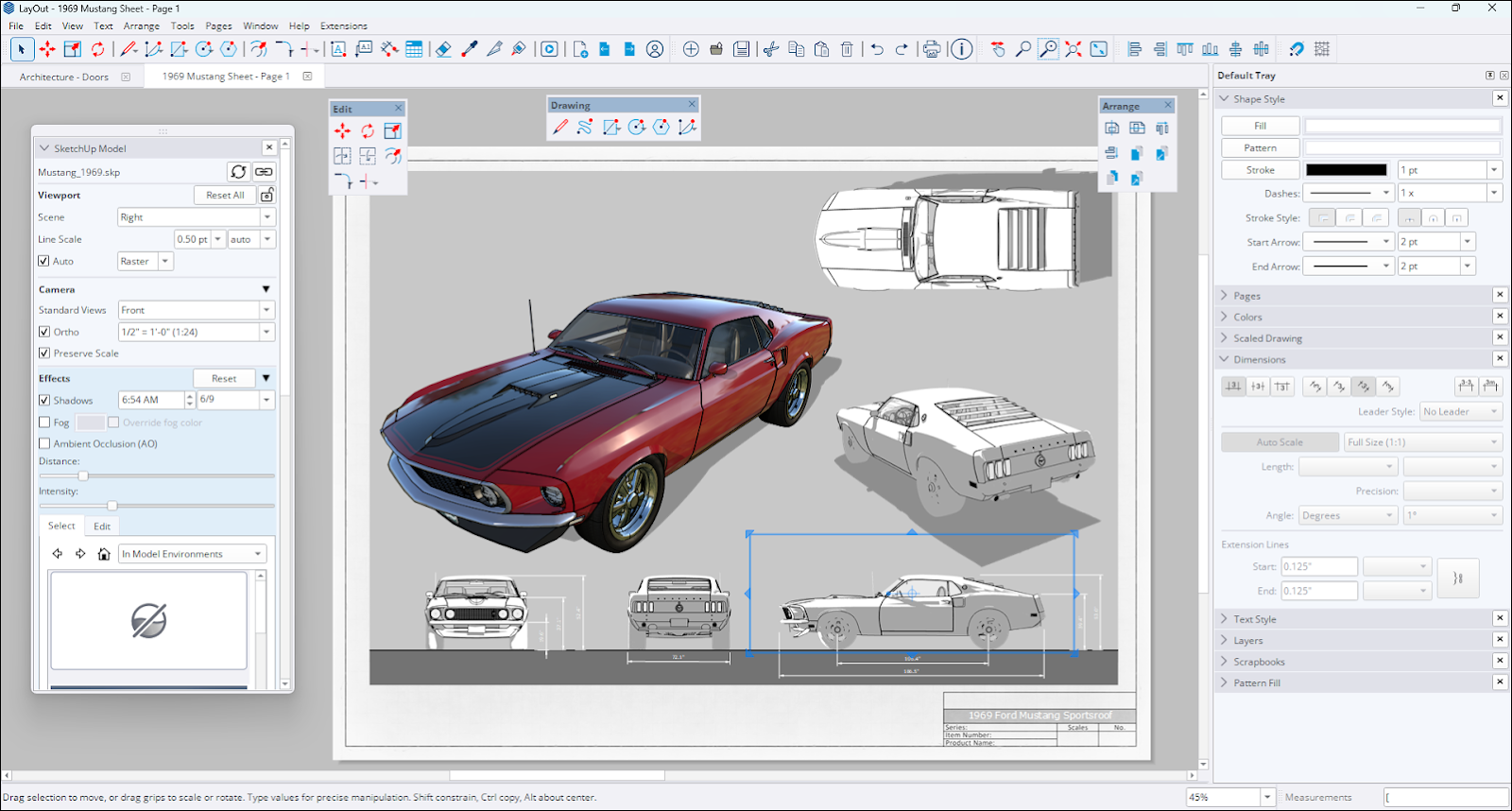
LayOut on Windows adopts SketchUp-style trays and panels, plus more flexible toolbars. Vector and hybrid viewport generation is faster. Four drafting tools land—Trim, Extend, Fillet, and Chamfer—mapped to Shift+T/E/F/C, reducing selection overhead and cleanup clicks on typical 2D tasks. DWG export can split each page to its own DWG, preserves SketchUp Tag names as DWG layers, and correctly stacks coincident viewports in model space; text, hatches, and tables round-trip more faithfully. Default Scrapbooks gain an Architecture set—doors, windows, living, bedroom, kitchen, bath—as scalable groups.
Bug fixes (selected): stability, materials, components, graphics engine quirks
Expect fewer crashes when editing Live Components or importing large images under the new graphics engine, corrupt normal maps no longer block loads, and file associations prefer the latest version. Selection performance on complex models improves. Numerous Windows and macOS UI inconsistencies are resolved, including materials panel behaviour, tag colour previews, scene tab selection, file thumbnails, Environments downloads, and various DWG importer/exporter issues.
API & developer notes: scenes are now undoable; non-invertible transforms rejected; IFC exporter updated
Scene operations are now undoable. Extension authors must wrap scene edits in Model#start_operation and #commit_operation or risk flooding the undo stack and Extension Warehouse rejection. Non-invertible transforms—like scale-to-zero—are rejected for component instances, groups, and images in both Ruby and C APIs. The Ruby API moves to a unified IFC exporter with options for version and hierarchy; there are new accessors for active section planes, safer page naming, style add/remove returns, and assorted fixes. LayOut’s APIs add linear dimension alignment, leader-line visibility, text strikethrough, attribute dictionaries, and camera/viewport override control. Test any extension that touches scenes, transforms, or exporters.
Upgrade guidance
If your day involves DWG/IFC exchange, LayOut deliverables, or frequent client review, the upgrade pays off immediately. Extension authors should validate scene logic due to undo changes. On macOS, note that cube material thumbnails are Windows-only. Pilot on a single machine, test your critical extensions, then roll out.
