



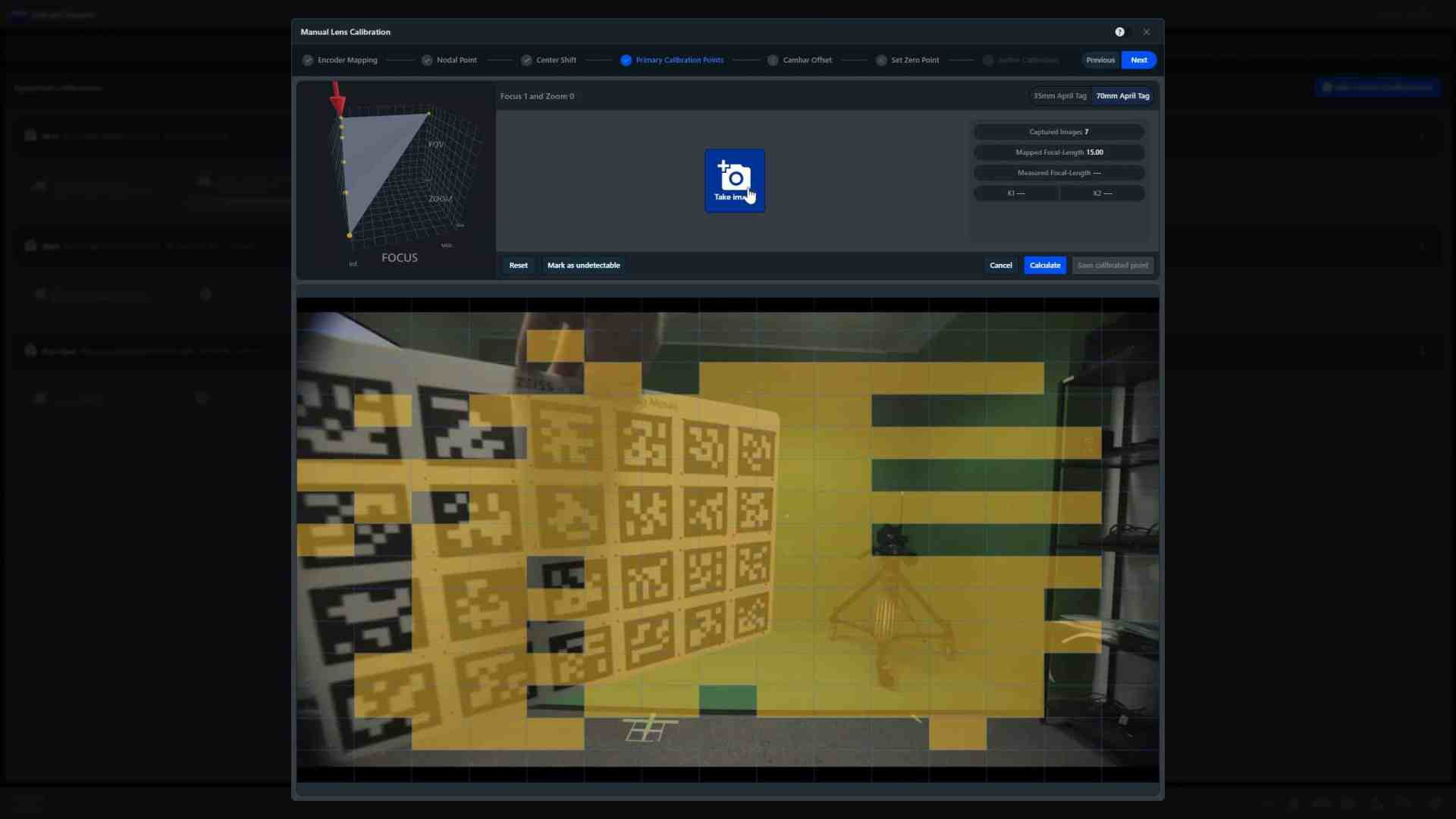
The latest update to ZEISS’s CinCraft Scenario camera tracking system (Version 2.1) opens new possibilities for virtual production and broadcast professionals by adding full manual calibration capabilities for spherical lenses. This upgrade allows users to manually calibrate lenses without relying on predefined templates—an advantage for those working with a wide variety of lenses or for situations where proprietary templates are unavailable.
CinCraft Scenario 2.1 adds key features and improvements for enhanced control. Users gain Manual Lens Calibration to create and calibrate custom lenses, and a Manual CamBar Offset option to adjust offsets directly in the dashboard. A new Clip Name Field auto-fills on ARRI and Sony cameras, while remaining editable on others. Other updates include an External Encoder Homing Reminder for calibration changes, a unified Lens Finetuning and Manual Calibration workflow, and improved guidance for CamBar Offset Calibration. Additionally, a Link Update Status alert appears with outdated Links, a Marker Placement Warning resets markers when re-entered, and a Low Density Point Cloud option and Default Tracking Smoothing are now available for simplified tracking setups.
Expanded Manual Calibration and Lens Flexibility
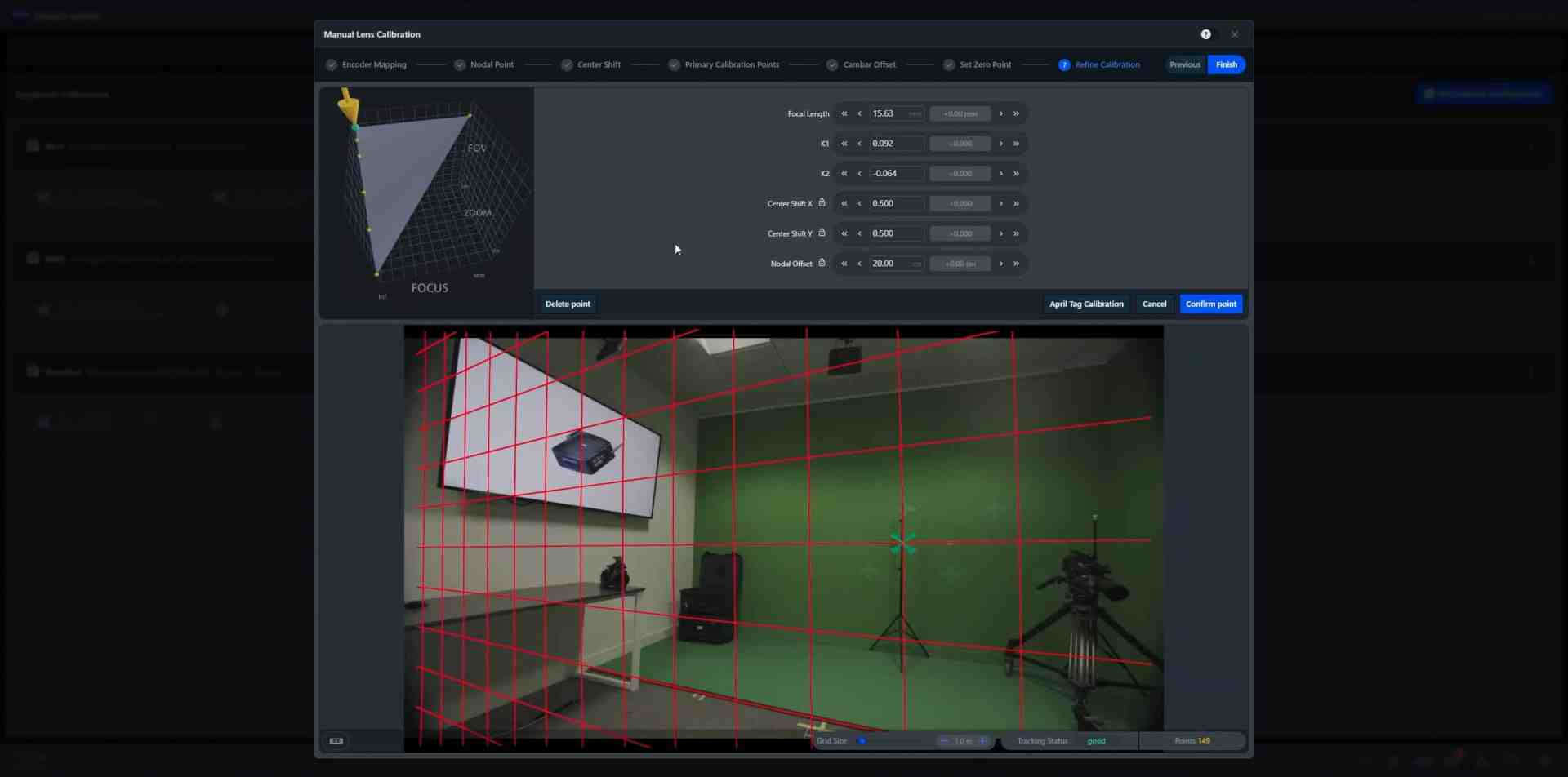
CinCraft Scenario 2.1’s calibration process provides guided steps for users to set essential lens parameters (focus, aperture, zoom) within the software, initiating a calibration with a chart. This first pass can then be refined until satisfactory results are achieved. Users now have the option to create new lens templates for third-party lenses, broadening compatibility beyond ZEISS lenses.
CamBar Offset Adjustment and Clip Name Recognition
A new feature in CinCraft Scenario 2.1 enables manual adjustment of the CamBar offset—the distance between the camera and the CamBar—without depending on the automatic “Offset Assistant” or switching to a wide-angle lens. Product Manager Tom Evans notes that this streamlines on-set operations by speeding up adjustments. Frequently used offsets can also be saved, enabling quick setup when switching between different camera rigs. Additionally, the software now recognizes clip names automatically on ARRI and Sony cameras, streamlining data management in post. For cameras lacking auto-name functionality, users can manually input the clip name during recording.
Enhanced Export Features with Undistortion ST Maps and Point Cloud
The CinCraft Export 2.0 update brings added post-production tools, notably with the introduction of Undistortion ST Maps. These maps replace the need for lens grid shots at setup, allowing for a straightforward distortion correction that can be re-applied in later compositing stages. This feature, paired with CinCraft’s Distortion Maps, simplifies lens distortion handling, particularly useful for VFX teams aiming to streamline workflows.
Further, the Export 2.0 release introduces a Point Cloud feature for VFX teams, providing spatial data on the camera’s environment and position during production. This data comes in PTS format for Unreal Engine and FBX format for Nuke, offering flexibility across common VFX software. The Point Cloud allows VFX artists to visualize the filming space, which assists in aligning camera tracking for accurate compositing in post.
Bug Fixes for Improved Stability
CinCraft Scenario 2.1 also brings a host of bug fixes to enhance user experience and stability. Key issues addressed include: resolving discrepancies between frontend and backend renderers, fixing calibration retargeting when moving lenses between cameras, and ensuring that manual and template lenses are copied correctly when cloning a camera. Additional fixes include correcting an inverted view when using the Ncam Mk2 Camera Bar, displaying the correct zoom value, and addressing inaccurate initial offset values used for CamBar offset in lens calibration. The update also resolves issues with encoder mapping when fields are left blank, unblocking the UI for nodal input values, and making the center shift line visible during calibration. Furthermore, it delivers smoother zoom with /i zoom lenses and /i encoder cables, and ensures Canon and Fujinon encoders are accurately marked as “normalized.”
Availability and Support
The updated CinCraft Scenario 2.1 and Export 2.0 software are available for download as of November 7, 2024. ZEISS is offering online live demos covering the new calibration process, and additional training materials, including videos and documentation, are accessible via ZEISS’s CinCraft website. To review the full release notes, visit ZEISS’s CinCraft Scenario 2.1 release page. CinCraft Export 2.0 is available for download here.
Pricing and Caution
Users are encouraged to assess these new features for stability and simplicity within their workflows before implementation. For exact pricing, please refer to the official CinCraft product page – and remember to contact the team if you have any questions.
With these updates, ZEISS continues to refine its virtual production tools, keeping practical needs like lens flexibility and post-production accuracy in mind—though the real verdict will come once production artists put them to the test.
